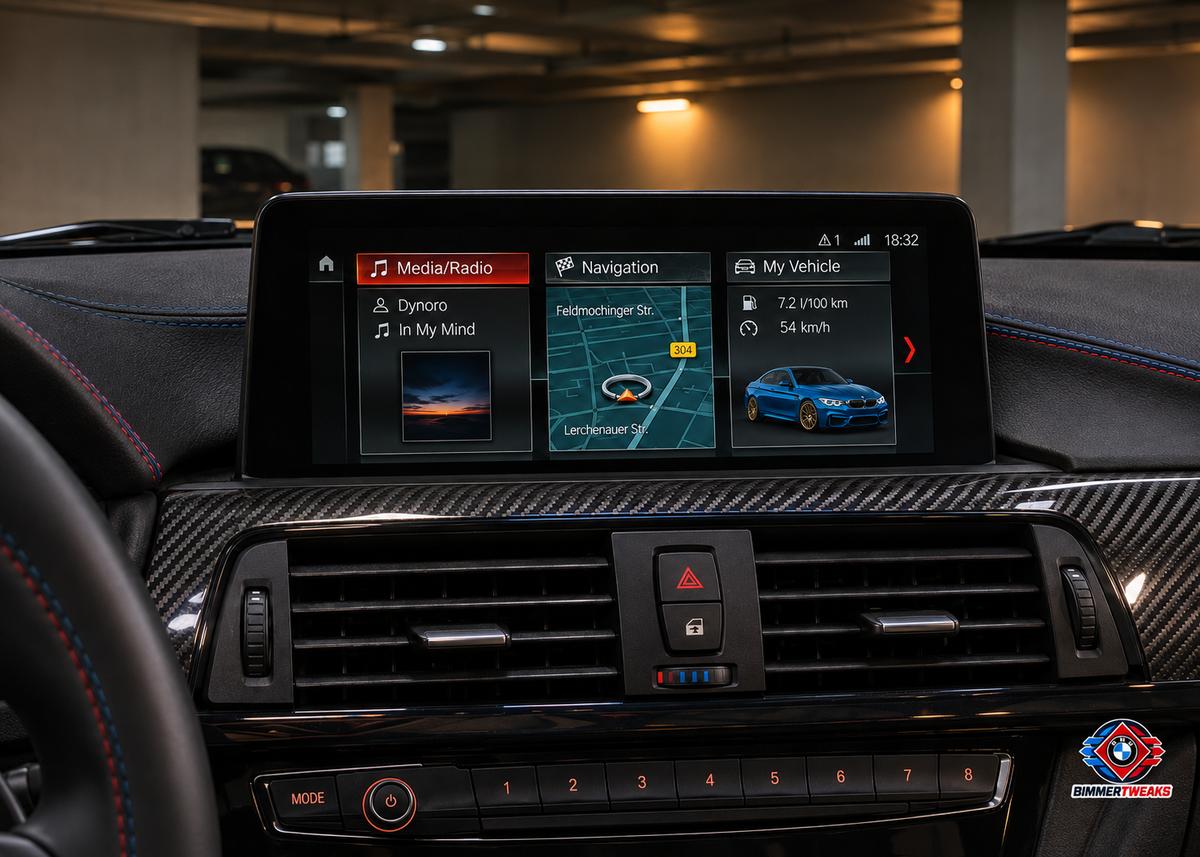
Let your iDrive display reflect your BMW
Personalise the vehicle image in your iDrive menu to better match your own BMW.
Choose a representation closer to your BMW's body style, colour and wheels. We prepare the image with correct proportions and install it in the supported vehicle-image area. On the illustrated ID6 home menu, the custom car appears inside the My Vehicle tile.
Send us a photo of your BMW. You can also send us a clear photo of your own car on WhatsApp, so we can prepare the custom iDrive image based on its actual colour, wheels and appearance.
Your remote coding session
- Preparation and proportional placement of the agreed vehicle image.
- Remote installation in the supported iDrive vehicle-image area.
- Backup of the existing image where supported and a final appearance check.
Check BMW compatibility by VIN
Check compatibility and arrange your session
NBT EVO ID5 / ID6. For compatible NBT EVO ID5 and ID6 head units only. Send the software-version photo and a clear vehicle reference or suitable image. We agree the image, supported display location and any preparation work before the appointment.
- Start with our BMW VIN Check to review the factory configuration.
- Send us a photo of the current iDrive software-version screen and the details requested for this service. The installed head unit is checked separately if the car has been retrofitted.
- We confirm the supported option, the preparation needed and the appointment before work begins.
Ask BimmerTweaks on WhatsApp
What you need
A Windows 10/11 laptop connected to the vehicle with an ENET cable, a stable internet connection and suitable vehicle power support. We confirm the connection setup with you before the appointment.
Remote service: You are booking a remote service for the agreed vehicle. BimmerTweaks prepares the files, performs the installation and checks the agreed result with you; the coding tools are operated by us.
This personalises the supported iDrive vehicle image. It does not change the car's equipment, instrument-cluster graphics, camera view or parking-assistance display.
BimmerTweaks is an independent service provider and is not affiliated with BMW AG.