

📱 Enable Apple CarPlay Full Screen on BMW vehicles that currently support only Split-Screen CarPlay.
This service activates full-screen CarPlay for BMW F and G Series vehicles equipped with NBT EVO ID5 / ID6 or EntryNav2 head units.
⚠️ Compatible only with EVO and EntryNav2 systems.
Before purchasing, please contact us to confirm compatibility with your vehicle.
🧭 Check Your BMW Head Unit
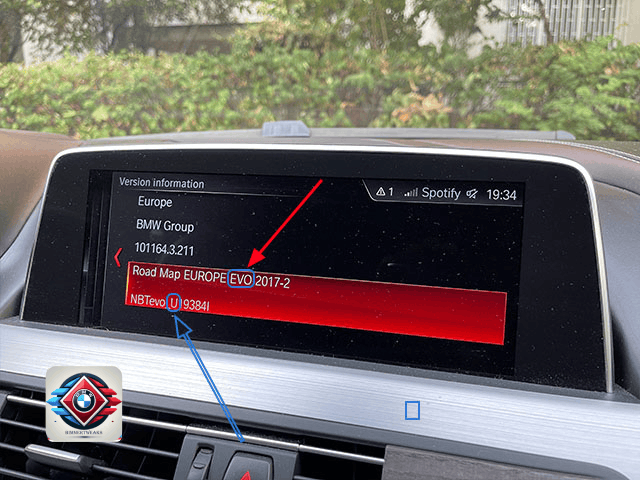
You can verify your system version directly in iDrive:
Navigation → Options Button → Settings → Position & Version History → Version Information
Check the map type displayed in your system:
- Road Map “Region” EVO → Your car has an EVO head unit
- Road Map “Region” WAY → Your car has an EntryNav2 head unit
💾 Activation via USB (EVO Only)
This method is available only for EVO head units with firmware versions:
- NBTevo_N
- NBTevo_O
The activation process is simple:
- 📧 We send you an activation file and instructions via email
- 💾 Copy the file to a USB flash drive
- 🔌 Insert the USB drive into the vehicle armrest USB port
- 🔄 The navigation system reboots and CarPlay Full Screen becomes active
💻 Activation via ENET Cable (EVO & EntryNav2)
For newer firmware versions the activation is performed using an ENET cable.
You will need:
- 🔌 ENET cable (not included / we do not sell it)
- 💻 Mac or Windows 10 / Windows 11 laptop
- 🛡 Firewall and antivirus disabled
- 🌐 Strong and stable internet connection
The process takes approximately 2 minutes.
No coding experience is required — simply run our Feature Installer using the instructions we provide.
✅ Compatibility
EVO Full Screen Supported
- Firmware versions: NBTevo_P, Q, R, S, U, V, W, Y, Z
EntryNav2 Full Screen Supported
- iLevel 20-07 or newer
❌ Full Screen Not Possible
- EVO units with firmware versions H, I, J, K, L, M
- EntryNav2 units with iLevels older than 20-07
📩 Not Sure if Your BMW is Compatible?
Send us your VIN number and we will check compatibility before purchase.
➡ Contact us anytime using the WhatsApp button below.